Miro Digital Whiteboard – Visual Collaboration for Remote Teams
Miro addresses a collaboration gap that text-based tools cannot fill — the need for visual thinking,
spatial organization, and shared canvas collaboration that physical whiteboards provide in office
environments. When remote and hybrid work eliminated access to conference room whiteboards, Miro
emerged as the leading digital alternative, providing an infinite canvas where teams can brainstorm,
plan, diagram, design, and workshop together in real-time regardless of physical location. The
platform’s growth reflects a genuine need — many collaborative activities are fundamentally visual
in nature, and trying to conduct brainstorming sessions, process mapping, journey mapping, and
strategic planning through text documents or slide presentations sacrifices the spatial thinking
and organic flow that visual collaboration enables.
Miro’s competitive position in the visual collaboration space is strongest among platforms designed
specifically for team whiteboarding and visual workshops, competing with alternatives like Mural,
FigJam (from Figma), Lucidspark, and Microsoft Whiteboard. The platform distinguishes itself
through the depth of its facilitation features, the breadth of its template library, the
quality of its real-time collaboration experience, and its integration ecosystem that connects
visual collaboration outputs with the project management, design, and development tools where
work happens after the whiteboard session ends.
Infinite Canvas and Core Tools
The infinite canvas provides an unbounded workspace where content can expand in any direction
without the constraints of fixed page or slide dimensions. This spatial freedom enables
organizing ideas, workflows, and visual content with the natural spatial relationships that
physical whiteboarding affords — grouping related concepts, positioning items in sequences,
creating spatial hierarchies, and using proximity and arrangement to convey relationships
between ideas. The canvas supports smooth zooming from high-level overview to detailed content,
enabling both big-picture strategic views and detailed examination of specific areas within
the same visual space.
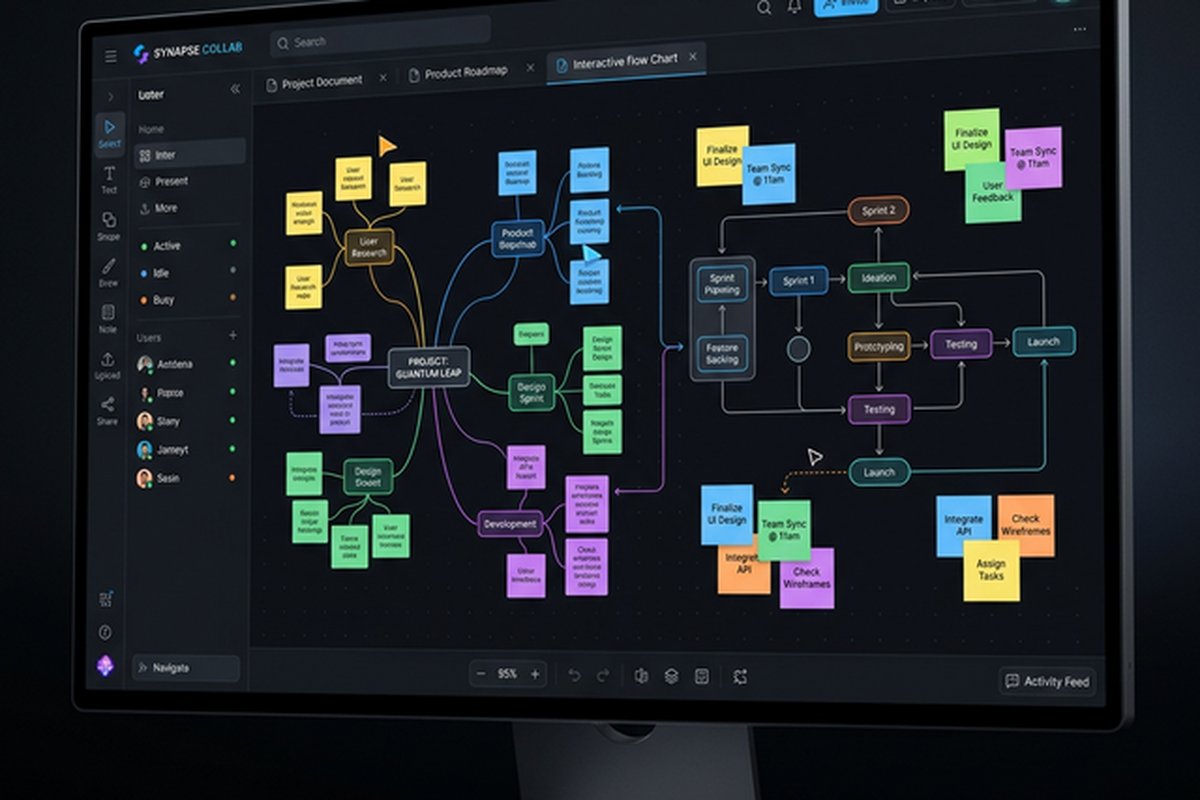
Core drawing and organization tools include sticky notes (the fundamental brainstorming element),
shapes, connectors and arrows, freeform drawing, text objects, frames for organizing canvas
sections, and embedded content including images, videos, documents, and links. The sticky note
functionality goes beyond simple text boxes — sticky notes support color coding, tagging,
clustering, and voting that enable structured brainstorming methodologies like affinity mapping,
dot voting, and categorization exercises. The connector and arrow tools enable creating diagrams,
flowcharts, mind maps, and process maps with intelligent routing and connection points that
maintain relationships when elements are repositioned.
Template Library and Frameworks
Miro’s template library provides pre-built frameworks for common collaborative activities including
brainstorming exercises, retrospectives, strategy frameworks, design thinking workshops, customer
journey maps, sprint planning boards, SWOT analysis, stakeholder maps, and dozens of additional
structured activities. Templates provide starting structures that eliminate the blank-canvas
paralysis that can stall workshop sessions, giving facilitators ready-made frameworks that
participants can begin contributing to immediately.
The template marketplace includes both Miro-created templates and community-contributed templates
that cover specialized use cases across industries, methodologies, and team activities. Custom
templates enable organizations to create standardized frameworks for recurring activities —
consistent retrospective formats, standardized project kickoff canvases, and organizational
frameworks that ensure visual consistency and process compliance across teams. The template
system supports both the facilitator who needs quick access to proven workshop formats and
the organization that wants to standardize visual collaboration practices across multiple
teams and departments.
Real-Time Collaboration Experience
Miro’s real-time collaboration enables multiple users to work on the same canvas simultaneously
with visible cursors, real-time updates, and presence indicators showing who is active on the
board. The collaboration experience supports both synchronous working sessions (live workshops
and meetings) and asynchronous collaboration (contributing to boards independently over time).
The timer and voting features support structured workshop facilitation — timers for
timeboxed activities, voting for prioritization exercises, and presentation mode for
walking through canvas content in a guided sequence.
The facilitation tools distinguish Miro from simpler whiteboard applications by supporting
the structured, time-managed workshop formats that professional facilitators use. Attention
management features bring all participants’ views to the same canvas location, preventing
the disorientation that occurs when participants wander different areas of a large canvas
during facilitated sessions. The video chat integration enables voice and video communication
directly within the Miro interface, eliminating the need to run a separate video conferencing
tool alongside the whiteboard for synchronized collaboration sessions. For comprehensive
video conferencing needs alongside visual collaboration, our Zoom
review covers the leading video platform.
Diagramming and Visual Planning
Beyond free-form whiteboarding, Miro provides structured diagramming capabilities for flowcharts,
process maps, org charts, network diagrams, sequence diagrams, and other formal visual formats.
The smart diagramming features include snap-to-grid positioning, automatic connector routing,
shape libraries for standard diagram notations (UML, BPMN, network diagrams), and import
capabilities for existing diagrams from tools like Visio and Lucidchart.
The diagramming tools support wireframe creation for rapid interface prototyping, user flow
diagrams for mapping application navigation patterns, and system architecture diagrams for
visualizing technical infrastructure — making Miro valuable for technical teams who need
collaborative diagramming alongside less structured brainstorming activities.
Mind mapping capabilities provide radial idea organization that supports creative exploration
and hierarchical concept development. Starting from a central concept, branches expand outward
with sub-topics, details, and connections that capture the associative thinking patterns that
linear document formats constrain. The mind map nodes can be converted to sticky notes for
subsequent brainstorming activities or to task cards for project planning, maintaining continuity
between ideation outputs and actionable work items. Presentation mode enables creating guided
walkthroughs of canvas content by defining frames with navigation sequences, transforming
expansive whiteboard content into structured presentations that communicate workshop outcomes
and visual plans to stakeholders who were not present during the collaborative creation process.
The project planning visualizations support Kanban boards, timelines, roadmaps, and dependency
maps within the visual canvas context. These planning tools enable teams to create visual project
plans during planning sessions and maintain them as living visual documents that update as projects
progress. The Kanban framework within Miro provides card-based task tracking with customizable
columns, card details, and tag-based filtering that serves lightweight project tracking needs
without requiring a separate project management tool. For teams needing dedicated project
management tools that integrate with visual collaboration outputs, our Trello
board guide covers a platform with deeper Kanban capabilities.
Integration Ecosystem
Miro’s integration ecosystem connects visual collaboration with the tools where work continues
after whiteboard sessions end. Project management integrations with Jira, Asana, Monday.com,
and Trello enable converting sticky notes and visual elements into project tasks, syncing
status updates between boards and project tools, and embedding project views within Miro
canvases. Design tool integrations with Figma, Sketch, and Adobe Creative Cloud enable
embedding design assets and prototypes within visual collaboration contexts for design
review and feedback sessions.
Development integrations connect Miro with Confluence for documentation, GitHub for development
workflows, and Notion for knowledge management. Communication integrations with Slack and
Microsoft Teams enable sharing board content, receiving notifications, and accessing Miro
functionality from within communication platforms. The API enables building custom integrations
for organization-specific workflows that connect Miro’s visual collaboration data with
internal systems and processes.
Pricing and Accessibility
Miro offers a free plan with limited boards and core features, a Starter plan for small teams,
a Business plan with advanced features and administration, and an Enterprise plan with
security, compliance, and advanced governance features. The free plan provides sufficient
access for individual users exploring the platform and small teams with limited visual
collaboration needs. The paid plans unlock unlimited boards, advanced collaboration features,
and administrative controls that growing teams require.
The pricing per-user model means that costs scale with team size, which can become significant
for large organizations with many occasional users. Organizations should evaluate which team
members need full Miro access versus occasional viewer access, as the viewer-editor distinction
affects practical cost for large-scale deployment. For teams evaluating free collaboration
options, our free
tools comparison covers alternatives across collaboration categories.
Workshop Facilitation Best Practices
Effective remote workshops on Miro require facilitation techniques adapted to the digital canvas
environment. Pre-building workshop boards with clear instructions, pre-positioned sticky note areas,
and activity frameworks before participants join eliminates the setup time that consumes valuable
workshop minutes and provides participants with immediate clarity about where to contribute and what
is expected. Color-coded sticky notes assigned to different participants or groups enable visual
identification of contributions without requiring name labels on every element, speeding the
brainstorming process while maintaining attribution.
Timeboxing activities using Miro’s built-in timer creates urgency that prevents the open-ended
wandering that derails virtual workshops. A typical design thinking workshop might allocate five
minutes for individual brainstorming on sticky notes, three minutes for silent reading of others’
contributions, ten minutes for group clustering and discussion, and three minutes for dot voting
on prioritized clusters. The facilitation toolbar’s “bring everyone to me” feature prevents the
common problem of participants exploring different canvas areas during guided activities, ensuring
collective focus during structured facilitation phases while allowing independent exploration during
open working sessions.
Icebreaker templates and warm-up activities help overcome the participation hesitancy that remote
workshops commonly face. Starting with low-stakes interactive activities — placing markers on a
map to show locations, adding photos that represent moods, or completing simple visual challenges —
establishes comfort with the canvas interaction before the substantive workshop activities begin.
Post-workshop, the persistent canvas preserves the complete workshop output, eliminating the
need to photograph physical whiteboards or transcribe sticky notes into digital formats.
Enterprise Deployment and Governance
Enterprise Miro deployments require governance frameworks that balance creative freedom with
organizational consistency and security requirements. Board ownership policies establish who
is responsible for maintaining active boards, archiving completed boards, and ensuring that
sensitive information within boards is appropriately access-controlled. Template governance
ensures that organizational templates maintain consistent branding, frameworks, and quality
standards across departments rather than degrading through uncoordinated modifications.
The Enterprise plan provides administrative controls including SSO integration, SCIM user
provisioning, domain-level management, audit logging, and data governance features that
IT departments require for managing organization-wide Miro access. Data residency options
enable specifying geographic regions for data storage, addressing compliance requirements
for organizations operating under regional data sovereignty regulations. The admin console
provides usage analytics showing active users, board creation rates, and collaboration
patterns that enable measuring organizational adoption and identifying teams that may
need additional training or support to realize the platform’s value. Content classification
features help organizations manage the sensitivity of board content, preventing inadvertent
sharing of confidential strategic planning or competitive analysis boards beyond their
intended audience.
Strengths and Honest Limitations
Miro’s strengths include the richest visual collaboration experience among dedicated whiteboard
platforms, an extensive template library covering diverse workshop and planning methodologies,
real-time collaboration that supports both synchronous and asynchronous teamwork, facilitation
tools that support professional-quality remote workshops, structured diagramming capabilities
alongside freeform whiteboarding, and an integration ecosystem that connects visual outputs
with productivity and development tools. The platform excels at enabling the visual, spatial
thinking that text-based collaboration tools cannot replicate.
Limitations include per-user pricing that becomes expensive for large teams with occasional
users, a learning curve for facilitators who need to master both the tool and effective
virtual facilitation practices, performance that can slow with very large boards containing
extensive content, and the challenge of maintaining boards as living documents versus
session artifacts that become stale after workshops end. Some teams find that after the
initial enthusiasm for visual collaboration, usage patterns settle into specific activities
(retrospectives, brainstorming, planning sessions) rather than the comprehensive visual
workspace that Miro envisions, which affects the practical return on per-user subscription
investment.
Features and pricing referenced in this article are based on information available at the time of
writing and are subject to change. Please verify current details on the official Miro website.