Microsoft Project Desktop vs Online – Enterprise PM Solutions
Microsoft Project occupies a unique position in the project management software landscape. While newer
cloud-native tools compete on collaboration convenience, visual appeal, and consumer-friendly interfaces
designed to minimize learning curves, Microsoft Project has spent decades building depth in the traditional
discipline of project scheduling — the mathematical, resource-constrained, dependency-driven planning that
large organizations require when managing complex initiatives worth millions of dollars with dozens or
hundreds of interdependent tasks, multiple specialized resource pools, and inflexible external deadline
constraints.
Today, Microsoft Project exists in two distinct forms that share a name but differ significantly in their
capabilities, deployment model, licensing structure, and target audience. Microsoft Project Desktop, also
known as Project Professional and Project Standard, is the traditional locally-installed application with
deep scheduling intelligence, resource management, and earned value analysis. Microsoft Project for the Web,
commonly called Project Online, is the cloud-based version built on the Microsoft Power Platform that
emphasizes collaboration, accessibility, and integration with the modern Microsoft 365 ecosystem.
Understanding the differences between these two versions is essential for organizations evaluating Microsoft
Project, because choosing the wrong version can result in either paying for sophisticated capabilities your
team will never use or, more problematically, discovering that the version you selected lacks critical
scheduling capabilities your projects genuinely require.
This article provides a comprehensive comparison of both versions, exploring their scheduling capabilities,
resource management features, reporting and analytics, collaboration experiences, deployment considerations,
and the hybrid approaches that many organizations adopt to leverage the strengths of each version for
different project types and stakeholder audiences.
Microsoft Project Desktop — The Scheduling Powerhouse
Project Desktop has been the gold standard for complex project scheduling in traditional project management
for over three decades. Its scheduling engine implements the Critical Path Method with a sophistication and
depth that few other commercial tools match. The application calculates task schedules based on the
intersection of logical dependencies between tasks, resource availability calendars that define when each
team member or equipment asset is available for work and at what capacity percentage, effort-based duration
calculations that automatically adjust task durations when you add or remove assigned resources, and
multiple constraint types that allow you to fix task dates when external requirements mandate specific
timing regardless of what the scheduling algorithm would otherwise calculate.
The dependency modeling in Project Desktop supports all four standard relationship types — Finish-to-Start,
Start-to-Start, Finish-to-Finish, and Start-to-Finish — with configurable lead and lag times on each
dependency. Lead time allows a successor task to start before the predecessor finishes, modeling overlapping
work. Lag time introduces mandatory waiting periods between tasks, modeling situations like concrete curing
time, approval cycle durations, or shipping transit periods where work cannot proceed regardless of resource
availability. The combination of dependency types with lead and lag times enables precise modeling of
complex task relationships that reflect operational reality rather than simplified approximations.
Resource management in Project Desktop operates at a level of granularity and sophistication that
distinguishes it from every cloud-native project management tool on the market. Resources are defined with
maximum allocation percentages that reflect their real availability — a team member who splits their time
across three projects might be defined as available at thirty-three percent allocation to each project.
Resources have associated cost rates that can vary over time and by assignment type, enabling detailed cost
planning and earned value analysis that tracks both schedule performance and budget performance throughout
the project lifecycle. The resource leveling algorithm in Project Desktop can automatically resolve
over-allocation conflicts by rescheduling tasks within their available float, ensuring that no resource is
scheduled for more work than their defined capacity allows during any time period.
Earned value management deserves particular attention because it represents a level of project financial
analysis that is essentially absent from cloud-native project management tools. Earned value calculations
compare the planned value of work that should have been completed by a given date against the earned value
of work that was actually completed and the actual cost of that completed work. These three measurements
generate performance indices — Schedule Performance Index and Cost Performance Index — that objectively
quantify whether a project is ahead or behind schedule, over or under budget, and trending in a favorable or
unfavorable direction. For organizations managing projects with significant financial commitments,
contractual milestone payments, or regulatory reporting requirements, earned value analysis provides
quantitative accountability that subjective status reports and percentage-complete estimates simply cannot
match.
Baseline management allows you to save up to eleven separate baseline snapshots of the complete project
schedule throughout the project lifecycle. Each baseline captures planned start dates, finish dates,
durations, work hours, and cost estimates for every task at the moment the baseline is saved. As the project
progresses and actual dates diverge from the plan, comparing the current schedule against any saved baseline
provides precise, quantified measurement of schedule drift, effort variance, and cost deviation.
Microsoft Project for the Web — The Collaborative Alternative
Project for the Web represents Microsoft’s reimagined approach to project management, built on the Power
Platform and Dataverse rather than the traditional Project Desktop architecture. The web version emphasizes
accessibility through any modern browser without software installation, visual simplicity through clean
board and timeline interfaces, and tight integration with the Microsoft 365 ecosystem including Teams,
SharePoint, Outlook, and the broader Power Platform for workflow automation and custom application
development.
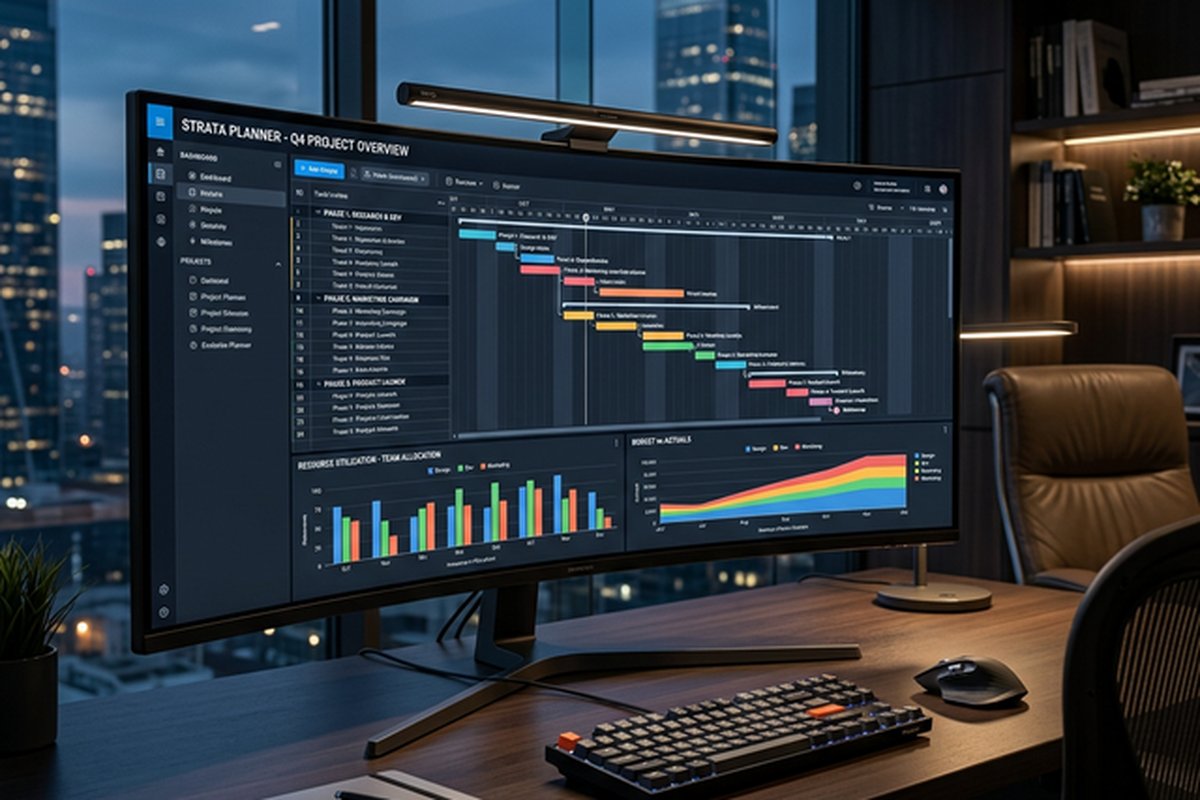
The web version provides three primary views for project management. Grid view presents tasks in a structured
table format with editable columns for task name, assignment, dates, duration, and dependencies. Board view
displays tasks as visual cards arranged in Kanban-style columns for workflow-based management. Timeline view
shows tasks as horizontal bars on a Gantt-style chart with visual dependency connections between tasks.
These views are visually clean, immediately intuitive, and accessible to stakeholders who have no
traditional project management training or experience.
Task management in Project for the Web supports basic task properties including names, descriptions, assigned
team members, start and end dates, duration, percentage complete, priority levels, and labels for
categorization. Dependencies between tasks with automatic schedule adjustment are supported, although the
dependency modeling is less sophisticated than Desktop’s implementation, lacking configurable lead and lag
times on dependencies and supporting only Finish-to-Start relationships in most configurations.
The integration with Microsoft Teams is a significant practical advantage. Project plans can be embedded
directly as tabs within Teams channels, allowing team members to view and update their task assignments
without leaving the communication platform they already use throughout their workday. This embedding reduces
context switching and increases the likelihood that project data stays current because updating tasks
requires no additional application launch, separate login, or navigation to a different interface.
Roadmap is a feature available at the organizational level that aggregates timeline information from multiple
Project for the Web instances and Azure DevOps projects into a single portfolio-level view. This
cross-project visibility allows portfolio managers and executive stakeholders to see key milestones and date
ranges across all active initiatives in a unified timeline without opening individual project plans. Roadmap
provides the high-level visibility that leadership needs for strategic decision-making about priorities,
resource allocation across initiatives, and portfolio-level risk assessment.
Key Differences Between Versions
The differences between Project Desktop and Project for the Web extend beyond feature lists into fundamental
architectural philosophy. Desktop is built for scheduling accuracy and computational sophistication — it
models resource constraints, calculates optimal schedules, performs what-if analysis, and generates earned
value metrics that quantify project performance against baselines with mathematical precision. The web
version is built for collaborative accessibility — it makes project plans visible, editable, and
understandable across the organization without requiring specialized project management training or locally
installed software.
Desktop supports detailed resource management with cost rates, availability calendars, and algorithmic
resource leveling that the web version does not currently provide. Desktop enables earned value analysis,
multiple baseline comparisons, detailed variance tracking, and dozens of customizable report types that the
web version cannot generate. Desktop supports custom fields with formulas, graphical indicators based on
calculated values, specialized date constraint types, and detailed scheduling options that give experienced
project managers granular control over how the scheduling algorithm interprets and resolves complex
dependency and resource conflict situations.
The web version provides real-time collaboration where multiple users can view and edit the same project plan
simultaneously — a capability that Desktop does not natively support without Project Server or Project
Online infrastructure. The web version offers browser-based accessibility that eliminates installation
requirements, IT deployment overhead, and operating system dependency. The web version integrates natively
with Teams, Power Automate for workflow automation, and Power BI for advanced analytics and visualization
that extend beyond Project’s built-in reporting capabilities.
Hybrid Deployment Approaches
Many organizations find that neither version alone satisfies all project management needs across their full
range of project types and stakeholder audiences. A common and effective hybrid approach uses Project
Desktop for complex, schedule-critical, resource-constrained initiatives where sophisticated dependency
modeling, resource leveling, earned value tracking, and detailed baseline comparison are genuinely
necessary. Simultaneously, the same organization uses Project for the Web for lighter-weight coordination
projects, team task management, and stakeholder-facing views where collaborative accessibility and visual
simplicity matter more than scheduling calculation depth.
Organizations already invested in the Microsoft ecosystem should also consider how Project integrates with
their existing tools. Power BI can connect to Project data for custom dashboard creation and analytics that
extend beyond the built-in reporting. Power Automate can trigger workflows based on project events such as
task completion, milestone dates approaching, or status changes. SharePoint can host project documentation
alongside project plans, creating a unified project information portal for stakeholders.
Custom Fields, Views, and Reporting
Project Desktop provides extensive customization capabilities through custom fields that extend the
default task, resource, and assignment attributes available in every project plan. You can define custom
text fields for categorization, custom number fields for scoring and weighting, custom date fields for
tracking secondary deadlines such as client review dates or regulatory submission dates that differ from
the primary task finish dates, custom flag fields for binary indicators like External Dependency or
Requires Legal Review, and custom cost fields for tracking supplementary financial data beyond the standard
cost and budget calculations. Each custom field can include a formula that calculates its value
automatically based on other field values, creating derived metrics tailored to your organization’s
specific reporting requirements and decision-making criteria.
Graphical indicators allow you to associate visual icons with custom field values based on configurable
threshold rules. For example, a custom Risk Score number field can display a green circle for scores below
three, a yellow triangle for scores between three and six, and a red diamond for scores above six. These
visual indicators appear directly in task table views, making it possible to scan hundreds of tasks and
instantly identify which ones carry elevated risk, require management attention, have unresolved external
dependencies, or exhibit any other condition you choose to define and track. This visual flagging system
creates a passive monitoring capability that surfaces important information through color and shape
recognition rather than requiring active column-by-column data reading across large project schedules.
Reporting in Project Desktop encompasses dozens of built-in report types covering project overview
summaries, resource allocation and utilization charts, cost tracking and budget variance reports, milestone
completion status, earned value performance curves, critical task listings, and assignment distribution
across resources. Reports can be customized with filtered data ranges, modified chart types, adjusted
grouping and sorting criteria, and branded formatting for professional stakeholder presentations. The
Visual Reports feature exports project data directly to Excel pivot tables and Visio diagrams for
advanced analysis and visualization that leverage the full capabilities of those companion applications.
Project for the Web approaches reporting differently, leveraging the Power Platform ecosystem rather than
built-in report templates. Project data stored in Dataverse can be accessed through Power BI for creating
custom dashboards with interactive charts, cross-project comparisons, trend analysis over time, and
filtered views tailored to different stakeholder audiences. This approach offers more flexibility in report
design and sharing than Desktop’s built-in reports but requires Power BI literacy and potentially separate
Power BI licensing depending on the organization’s existing Microsoft 365 subscription level. For
organizations that already use Power BI for business intelligence across other operational areas, extending
that capability to project management reporting creates valuable analytical consistency and eliminates the
need for stakeholders to learn yet another reporting interface.
Who Should Choose Which Version
The decision between Project Desktop and Project for the Web is ultimately a question about where your
team falls on the spectrum between scheduling sophistication and collaborative accessibility. Teams that
manage construction schedules with hundreds of resource-constrained dependencies, defense contracts with
earned value reporting requirements, manufacturing implementation projects with precise resource leveling
needs, large infrastructure rollouts with complex multi-year timelines, or any initiative where the
scheduling algorithm’s computational output genuinely drives operational decisions should strongly favor
Project Desktop. The scheduling engine’s mathematical rigor, the resource management granularity, and the
earned value analytics are capabilities that no cloud-native alternative currently matches at the same
depth and reliability.
Teams that prioritize collaborative project visibility across a distributed organization, need stakeholders
with varying technical expertise to view and update project information through their browser, want tight
integration with Microsoft Teams as the primary collaboration interface, or manage projects where task
coordination and status communication matter more than scheduling calculation precision will find Project
for the Web more aligned with their daily operational reality. The lower learning curve, the browser-based
accessibility, the real-time co-editing capabilities, and the native Teams embedding make project
information accessible to a broader organizational audience than Desktop can practically reach.
The licensing landscape for Microsoft Project is complex and worth careful evaluation. Project Plan 1
provides access to Project for the Web only. Project Plan 3 includes both Project for the Web and Project
Desktop. Project Plan 5 adds Project Online with Server capabilities for enterprise portfolio management.
Organizations should map their specific feature requirements against the available plan tiers to ensure they
are purchasing exactly the capabilities they need without paying for unused features or, worse, discovering
after purchase that their selected plan lacks essential functionality.
Organizations using Microsoft Dynamics 365 should also evaluate Project Operations, which integrates
project scheduling capabilities with financial management, resource scheduling, and billing workflows
within the Dynamics ecosystem. This integration is particularly relevant for professional service
organizations that need tight coupling between project execution data and financial systems for revenue
recognition, cost accounting, and client billing. Additionally, organizations currently using Project
Desktop should carefully plan any migration path to Project for the Web, as the two versions use
fundamentally different data architectures and file formats. Project Desktop saves plans as local MPP
files while Project for the Web stores data in cloud-based Dataverse tables, and there is no seamless
one-click migration tool that preserves all scheduling complexity, custom fields, baselines, and
earned value data between the two platforms.
For organizations evaluating alternatives to Microsoft Project that offer different approaches to enterprise
project management, our reviews of Wrike’s
timeline planning and Smartsheet’s
spreadsheet-based approach provide perspectives on platforms that combine scheduling capabilities
with more modern collaborative experiences.
Features and pricing referenced in this article are based on information available at the time of writing
and are subject to change. Please verify current details on the official Microsoft Project website.