Slack Workspace Organization – Team Communication Best Practices
Slack has fundamentally reshaped how teams communicate by replacing the chaos of scattered email threads,
fragmented instant messages, and disconnected collaboration tools with a centralized workspace where
conversations, files, decisions, and integrations converge into an organized, searchable environment.
Since its public launch in 2014, Slack has grown from a startup communication tool into the dominant
team messaging platform used by organizations ranging from two-person startups to Fortune 500
enterprises with tens of thousands of employees. The platform’s success stems not from revolutionary
technology but from thoughtful design that makes digital team communication feel natural, organized,
and genuinely useful rather than overwhelming.
However, Slack’s effectiveness depends almost entirely on how teams organize and use it. A poorly
organized Slack workspace with hundreds of unfocused channels, no naming conventions, and no
communication guidelines can be more distracting and less productive than the email it replaced.
Conversely, a thoughtfully structured workspace with clear channel strategies, established
communication norms, and strategic integrations becomes a genuine productivity multiplier that
reduces meeting time, accelerates decision-making, and creates searchable institutional knowledge
that persists beyond individual conversations. This article focuses on the organizational
strategies and best practices that determine whether Slack enhances or hinders team productivity.
Channel Organization Strategy
The foundation of an effective Slack workspace is a deliberate channel structure that organizes
conversations by purpose, team, project, or topic — making it intuitive for team members to find
the right place for every conversation and to locate past decisions and information. The most
effective channel strategies use consistent naming conventions with prefixes that categorize channels
at a glance: #team- for team-specific channels (#team-engineering, #team-marketing, #team-design),
#proj- for project channels (#proj-website-redesign, #proj-q2-launch), #dept- for department-wide
communication, and #help- for support requests (#help-it, #help-hr, #help-facilities).
Beyond naming conventions, channel descriptions and topic fields serve as critical orientation tools
that tell team members the purpose of each channel, what belongs there, and what does not. A channel
named #proj-mobile-app is ambiguous without a description specifying whether it covers development
discussions, design reviews, stakeholder updates, or all three. Setting channel topics to current
priorities — such as “Current focus: v2.1 bug fixes, release target March 15” — keeps channels
focused and provides immediate context for anyone joining mid-conversation. Regular channel audits
to archive inactive channels prevent workspace clutter that makes finding relevant channels
increasingly difficult as organizations grow.
Communication Norms and Etiquette
Effective Slack usage requires explicit communication norms that prevent the platform from becoming a
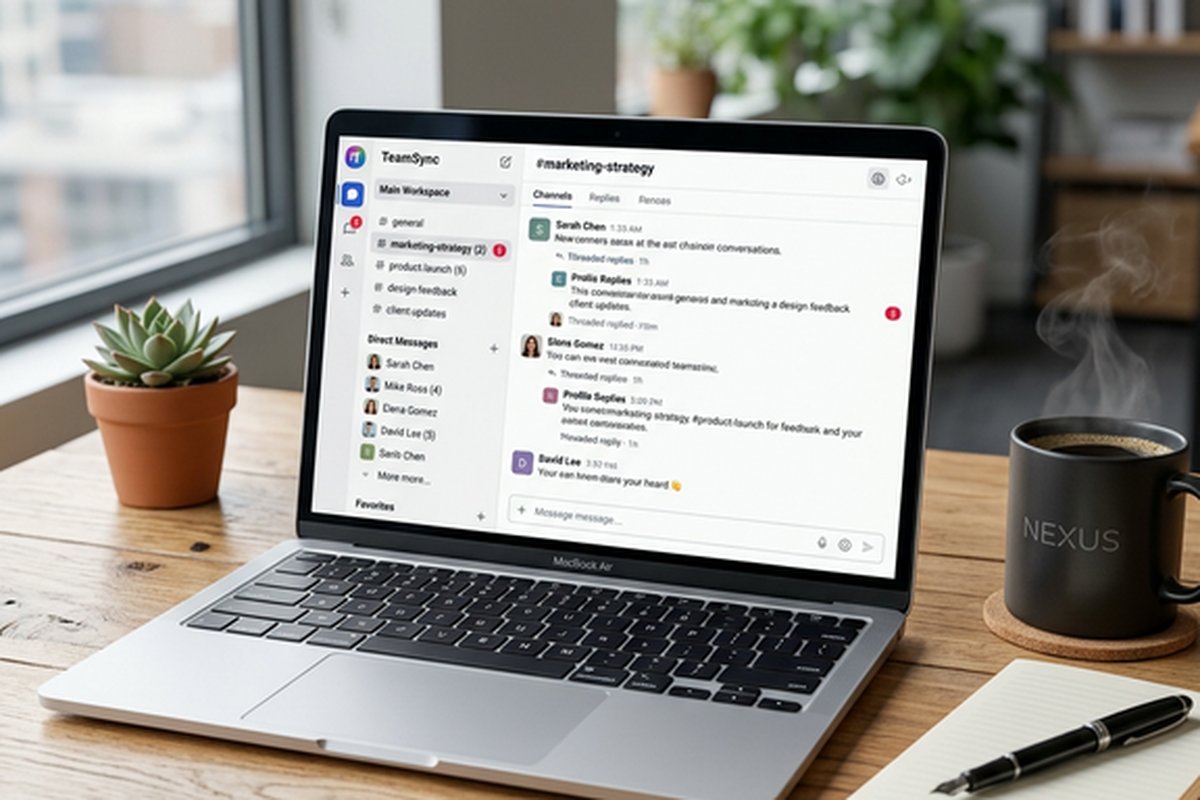
source of constant interruption and notification fatigue. The most important norm is threading —
replying to messages within threads rather than posting follow-up responses directly in the channel.
Threading keeps channel feeds scannable by containing multi-message conversations within expandable
threads, preventing the common problem of conversations overlapping and important messages getting
buried in unrelated exchanges. Teams that enforce threading discipline consistently report 40-60%
reduction in perceived channel noise and significantly improved ability to catch up on missed
conversations.
Notification management norms are equally critical. Teams should establish expectations about response
times — specifying that @channel should be reserved for urgent, time-sensitive matters affecting
everyone in the channel, @here for communications relevant to currently-online members, and
individual @mentions for directed questions that need specific responses. Many productive teams
establish “quiet hours” or “focus time” norms where non-urgent Slack messages are expected to
wait, protecting deep work periods from the constant interruption that real-time messaging can
create. The status feature should be used actively to communicate availability — “In deep work
until 2pm,” “In meetings until noon,” “Out sick” — reducing the anxiety of delayed responses by
providing visibility into why someone might not respond immediately.
Integration Ecosystem
Slack’s integration ecosystem connects the communication layer with the tools teams use for actual
work, reducing context switching and bringing actionable information into conversation contexts
where decisions are made. Project management integrations with tools like Asana, Trello, Jira,
and Monday.com enable receiving task updates, creating tasks from Slack messages, and tracking
project progress without leaving the communication environment. For teams evaluating project
management tools that integrate with Slack, our ClickUp
review covers a platform with particularly deep Slack integration.
Developer-focused integrations connect code repositories (GitHub, GitLab, Bitbucket), CI/CD
pipelines, monitoring systems, and incident management tools to Slack channels, creating
real-time visibility into development activities that engineering teams need for coordination.
Business tool integrations bring CRM updates, sales notifications, customer support tickets,
and analytics alerts into relevant channels, ensuring that business-critical information reaches
the right people without requiring them to monitor multiple separate dashboards throughout the
day.
Workflow Builder enables creating automated workflows triggered by specific events — a new
channel message, a specific emoji reaction, a scheduled time, or a webhook from an external
service. Workflow steps can collect information through forms, send messages, update channels,
and connect with external services through integration connectors. For teams that need structured
processes within their communication platform — onboarding checklists, request intake forms,
approval workflows, or recurring team rituals — Workflow Builder provides no-code automation
that operates within the communication context where teams already collaborate.
Analytics and Administration
Slack analytics provide workspace administrators with visibility into communication patterns,
adoption metrics, and usage trends. Message volume, active user counts, channel activity
distribution, and file sharing patterns reveal how teams use the platform and identify
potential communication issues — overly active channels that may need splitting, inactive
channels that should be archived, and usage patterns that suggest training opportunities.
The analytics dashboard enables measuring ROI of the Slack investment by tracking adoption
trends and identifying underutilized features that could improve team productivity.
Administrative controls include user provisioning through SCIM, SSO integration for secure
authentication, data retention policies that align with compliance requirements, and
export capabilities for legal holds and compliance archiving. Enterprise Grid provides
organization-level administration for large enterprises managing multiple interconnected
Slack workspaces, with centralized policy management, cross-workspace channels, and
unified identity management across the organization’s Slack deployment.
Slack Connect and External Collaboration
Slack Connect extends workspace capabilities beyond internal teams by enabling shared channels
between different organizations’ Slack workspaces. This feature enables agencies to collaborate
with clients, vendors to communicate with customers, and partner organizations to coordinate
joint projects — all within the familiar Slack interface rather than defaulting to email for
cross-organizational communication. Shared channels maintain each organization’s independent
workspace administration, data retention policies, and security controls while providing the
real-time, organized communication that email cannot match.
The practical impact of Slack Connect is most visible in client-facing service organizations
where communication speed and accessibility directly affect client satisfaction and project
velocity. Design agencies sharing channels with clients can get rapid feedback on creative
work, development firms can maintain transparent communication with stakeholders, and consulting
practices can stay accessible to clients without managing separate communication tools for
each relationship. The reduced friction compared to email exchanges — particularly for quick
questions, file sharing, and iterative feedback cycles — measurably accelerates collaborative
work between organizations.
Search and Knowledge Management
One of Slack’s most underutilized capabilities is its comprehensive search functionality that
turns conversation history into searchable institutional knowledge. Unlike email search that
is limited to individual inboxes, Slack search spans all channels a user has access to, making
it possible to find past decisions, technical explanations, process descriptions, and shared
files across the entire organizational conversation history. Effective search relies on good
channel organization — conversations in well-named, focused channels are dramatically easier
to find than those scattered across general-purpose channels.
Pinning important messages, bookmarking key decisions, and using canvas documents for persistent
reference information transform Slack from a ephemeral chat tool into a lightweight knowledge
management system. Teams should establish habits of pinning meeting decisions, project specs,
and reference links within relevant channels so that team members who join later or need to
reference past information can find it without re-asking questions that have already been
answered. The canvas feature provides a persistent document layer within channels for
maintaining living documents — onboarding guides, process documentation, and reference
information — directly alongside the conversations they support.
Huddles and Audio/Video Features
Slack Huddles provide lightweight audio conversations that occupy the space between typed messages
and formal video meetings. Starting a huddle is instantaneous — no meeting links, no calendar
invites, no waiting rooms — making it the digital equivalent of turning to a colleague’s desk
for a quick conversation. This low-friction audio capability fills a genuine communication gap
where typed messages are too slow or ambiguous for the conversation at hand, but scheduling a
formal meeting would be disproportionate to the discussion needed. For teams comparing video
conferencing options beyond Slack’s built-in capabilities, our Zoom
feature review covers a dedicated video platform with more advanced meeting capabilities.
Screen sharing within huddles enables quick demonstrations, collaborative troubleshooting, and
design reviews without leaving the Slack environment. The video clip feature enables recording
short video messages for asynchronous communication — explaining a concept, demonstrating a
workflow, or providing visual feedback — that recipients can watch at their convenience rather
than requiring synchronous availability. These audio and video features expand Slack’s
communication repertoire beyond text, addressing the common criticism that text-based
communication lacks the nuance and efficiency of spoken conversation for certain types
of discussions.
Security and Administration
Slack’s administrative controls enable workspace administrators to manage security, compliance,
and organizational structure through configurable policies. Enterprise Grid provides
organization-level administration for large enterprises with multiple interconnected workspaces,
centralized security policies, and compliance features including data loss prevention, eDiscovery
support, and custom data retention policies. The administrative layer supports SSO integration,
two-factor authentication enforcement, and device management policies that satisfy enterprise
security requirements.
Data retention policies enable configuring how long messages and files are retained, supporting
compliance requirements that vary by industry and jurisdiction. The audit log provides visibility
into administrative actions, login events, and security-relevant activities for compliance
monitoring and incident investigation. Channel management permissions enable controlling who
can create channels, invite external guests, and install integrations, preventing workspace
sprawl and maintaining security boundaries that protect sensitive information within
appropriate access controls.
Pricing and Plan Considerations
Slack offers a free plan with limited message history (90 days), limited integrations, and basic
features sufficient for small teams evaluating the platform. The Pro plan adds unlimited message
history, unlimited integrations, group video calls, and enhanced administrative controls. The
Business+ plan adds SAML-based SSO, data exports, and compliance features. The Enterprise Grid
plan provides organization-level administration, unlimited workspaces, and enterprise security
features for large organizations.
The pricing structure means that organizations must evaluate not just the per-user subscription
cost but the integration value, productivity impact, and reduced email/meeting overhead that
Slack provides. For small teams considering free collaboration options, our collaboration
tool comparison evaluates Slack alongside alternative team communication platforms
at various price points and capability levels.
Mobile Experience and Cross-Platform Sync
Slack’s mobile applications for iOS and Android provide a comprehensive mobile experience that
synchronizes seamlessly with the desktop and web clients. Notifications, message history, channel
membership, and file access persist across all platforms, enabling team members to transition
between desktop and mobile work without losing communication context. The mobile app supports
huddles, message composition with rich formatting, file sharing from device storage and cloud
services, and notification management that respects the same preferences configured on desktop.
The mobile experience extends Slack’s utility beyond desk-bound work into mobile and traveling
contexts where maintaining team communication awareness requires smartphone access. Custom
notification schedules enable configuring different notification behaviors for work hours versus
off-hours on mobile devices, protecting personal time while ensuring availability for truly
urgent communications. The mobile interface adapts Slack’s channel-based organization into a
mobile-friendly layout with swipe navigation, quick-access shortcuts, and optimized media
viewing that makes casual mobile check-ins practical without requiring the focused desktop
experience for every interaction.
Strengths and Honest Limitations
Slack’s strengths include the most polished team messaging experience available, an extensive
integration ecosystem that connects communication with work tools, powerful search that turns
conversation history into findable institutional knowledge, Slack Connect for cross-organizational
collaboration, huddles for lightweight audio conversations, workflow automation without coding,
and organizational tools (threading, channels, pinning) that enable structured communication
at scale. The platform’s user experience refinement — from notification controls to keyboard
shortcuts to emoji reactions — reflects years of iterative improvement that makes daily
communication genuinely pleasant.
Limitations include subscription costs that scale linearly with team size and can become significant
for larger organizations, the potential for notification overload without disciplined communication
norms, the learning curve for effective workspace organization that requires intentional setup
rather than organic growth, and the free plan’s 90-day message history limitation that restricts
its viability for teams that rely on searchable conversation history. Some teams find that Slack’s
real-time nature creates pressure for immediate responses that interrupts focused work, though
this is a cultural issue addressable through communication norms rather than a platform
limitation. The platform’s effectiveness is directly proportional to the organizational
discipline invested in channel structure, communication norms, and integration strategy.
Features and pricing referenced in this article are based on information available at the time of
writing and are subject to change. Please verify current details on the official Slack website.