CapCut has emerged as one of the most widely adopted video editing applications globally, specifically
targeting the short-form and social media video creation market that has exploded alongside the growth of
TikTok, Instagram Reels, YouTube Shorts, and similar platforms. Developed by ByteDance — the parent company
of TikTok — CapCut benefits from direct integration with TikTok’s ecosystem and a deep understanding of the
content creation workflows that drive social media video production. The desktop version extends CapCut’s
capabilities beyond the mobile application that initially built its user base, providing a more capable
editing environment while maintaining the accessibility and ease of use that define the CapCut experience
across all platforms.
What distinguishes CapCut from traditional video editing software is its design philosophy centered entirely
around contemporary social media content creation rather than attempting to serve professional broadcast or
film production needs. Every feature, interface decision, template, effect, and export option is optimized
for creating the types of content that perform well on social media platforms — short-form video, vertical
format content, trend-driven editing styles, and visually engaging clips that capture attention within the
first seconds. This focused approach creates an editing tool that excels at its target use case more
effectively than general-purpose editors that treat social media content as one of many supported workflows.
Desktop Editing Interface
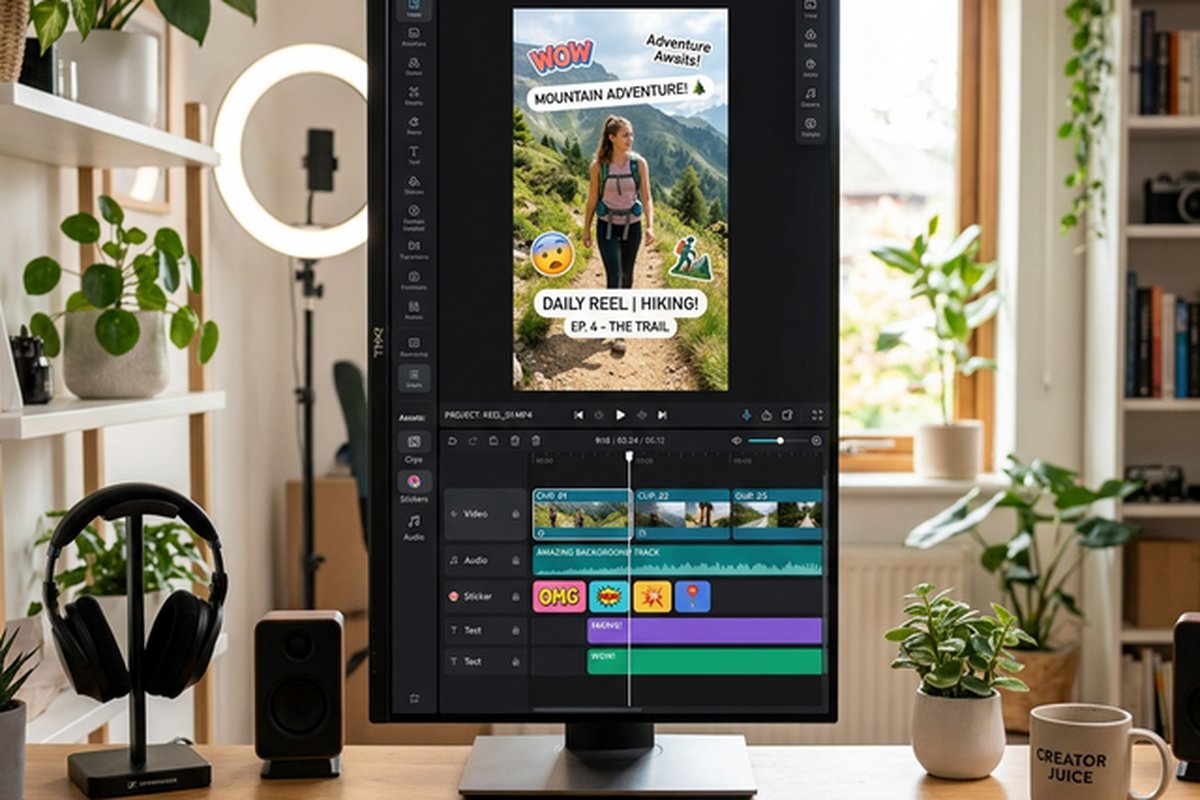
The CapCut desktop application provides a timeline-based editing environment that will feel familiar to users
of traditional video editing software while remaining substantially more approachable than professional
editors like Premiere Pro or DaVinci Resolve. The timeline supports multiple video and audio tracks with
standard editing operations including cut, trim, split, and merge. The preview window shows real-time
playback of the edit with effects applied, and the media panel provides organized access to imported
footage, audio, and the extensive built-in content libraries.
The interface prioritizes discoverability of effects, templates, and creative tools — the sidebar navigation
immediately presents categories including Effects, Transitions, Filters, Stickers, Text, and Audio rather
than hiding creative options behind menus or requiring users to know specific tool names. This design choice
reflects CapCut’s understanding that its target users are content creators who want to apply creative
effects quickly rather than technical editors who value efficiency through keyboard shortcuts and
customizable workspace layouts. The result is an editing experience where new users can create polished
content within minutes of opening the application for the first time.
AI-Powered Creative Tools
CapCut’s AI capabilities represent some of the most accessible and practically useful AI features in any
video editing application, specifically designed to automate tasks that would otherwise require technical
skill or significant time investment. Auto-captions generate synchronized subtitles from spoken dialogue
with remarkable accuracy across multiple languages, addressing the near-universal need for captioned social
media content where a significant percentage of viewers watch videos without sound. The caption generation
includes customizable styles, animations, and positioning that match current social media caption trends.
Background removal uses AI to separate foreground subjects from backgrounds without requiring green screen
filming, enabling background replacement, backdrop effects, and clean presentations with a single click. The
quality of CapCut’s background removal has improved significantly and now handles complex scenarios
including hair detail, semi-transparent elements, and moving subjects with results that approach
professional-grade keying for social media resolution content.
Smart editing features include auto-reframe for converting between aspect ratios with intelligent subject
tracking, text-to-speech with multiple voice options and languages for voiceover generation, AI-powered
style transfer that applies artistic visual styles to footage, and video upscaling that improves the quality
of lower-resolution source footage. These AI tools collectively reduce the technical barriers that
previously prevented casual creators from producing polished, professional-looking content and enable rapid
content production workflows where ideas can move from concept to published content with minimal friction.
Content Library and Templates
CapCut provides an extensive library of pre-made elements including video templates, music tracks, sound
effects, stickers, animations, text styles, transitions, and filters that are regularly updated to reflect
current social media trends. The template system enables users to apply complete editing styles — including
cuts, transitions, effects, and music — from trending TikTok and Instagram content formats to their own
footage. This template approach dramatically accelerates content creation for creators who want to
participate in trending formats without manually recreating the editing techniques involved.
The music and sound effects library includes licensed tracks available for commercial use within
CapCut-produced content, eliminating the copyright concerns that plague creators who use unlicensed music.
The audio library is curated for social media content with categories reflecting current music trends, viral
sounds, and content categories. Text styles and animations include options specifically designed for social
media content including trending caption styles, kinetic typography, and animated text reveals that would
require significant effort to create manually in traditional editing software.
Export and Platform Integration
Export options are optimized for social media platform requirements with preset configurations for TikTok,
Instagram Reels, YouTube Shorts, and other platforms that automatically set the correct resolution, aspect
ratio, frame rate, and compression settings. Direct publishing integration with TikTok enables uploading
edited content directly from CapCut to TikTok without intermediate file management. Custom export settings
support standard video codecs and resolutions for general-purpose use beyond social media platforms.
The cross-platform workflow enables starting edits on mobile devices and continuing on desktop, or vice
versa, with cloud-based project synchronization. This flexibility accommodates the common content creation
workflow where footage is captured and rough-edited on a phone before being refined on a desktop for final
production. The project transfer between mobile and desktop versions maintains timeline structure, applied
effects, and media references.
Advanced Editing Capabilities
Beyond its beginner-friendly surface, CapCut provides editing capabilities that enable more sophisticated
content creation for experienced users. Multi-track timeline editing supports complex compositions with
overlapping video layers, picture-in-picture arrangements, and independently timed audio tracks. Keyframe
animation enables creating custom motion paths for video elements, text objects, and effects parameters,
providing smooth movement and transformation animations that go beyond preset effect application.
Speed control tools include standard speed adjustment, smooth speed ramping with curve control for
cinematic speed transitions, and time-reverse capabilities. The speed ramping feature enables creating
professional-looking speed effects where footage smoothly accelerates and decelerates at editor-defined
points, producing the dynamic motion effects common in action content, sports highlights, and cinematic
social media content. Chroma key capabilities provide green screen background removal for creators with
studio setups, enabling background replacement compositing directly within CapCut’s editing environment.
The masking and blending tools enable creating layered compositions where specific regions of video are
revealed, hidden, or blended with other elements. Shape masks, feathered edges, and animated mask
transitions provide creative compositing possibilities that extend beyond simple cut-and-trim editing.
Color correction tools include basic exposure, contrast, and saturation adjustments alongside preset color
filters and LUT application capabilities that enable applying cinematic color grades to footage.
Commercial and Professional Features
CapCut for Business provides features specifically designed for brand and commercial content creation
including brand kit management with saved logos, colors, and fonts; team collaboration features for
shared editing projects; commercial music licensing for business content; and analytics integration for
tracking content performance across social media platforms. These business features position CapCut
as a viable content creation tool for social media marketing teams and small businesses producing their
own promotional content.
The web-based editing interface provides browser-based access to CapCut’s editing capabilities without
requiring desktop application installation, enabling editing from any computer with internet access
including shared workstations, library computers, and borrowed devices. The web editor provides a
subset of the desktop application’s features sufficient for basic editing and quick content creation
tasks. Cloud storage for projects and media enables accessing editing work from any device with CapCut
access, supporting the multi-device workflows common among social media content creators who may
edit across phone, tablet, and desktop throughout their production process.
Content Trends and Community
CapCut’s integration with TikTok’s content ecosystem creates a feedback loop where trending editing
styles, effects, and templates from popular TikTok content are quickly made available as CapCut
templates, enabling creators to participate in trending content formats with minimal manual editing
effort. The CapCut community template sharing system enables users to create and publish their own
editing templates, building a user-generated template library that supplements the officially
curated templates with community-created alternatives.
The trending effects and template system provides notifications when new viral editing styles emerge,
enabling creators to adopt trending formats quickly for maximum social media engagement. This trend
awareness functionality positions CapCut as not just an editing tool but a social media content
intelligence platform that helps creators stay current with rapidly evolving content preferences.
Tutorial content within the application provides guided walkthroughs for using specific features
and recreating specific content styles, reducing the learning curve for new features and helping
creators expand their editing capabilities incrementally.
Privacy and Data Considerations
CapCut’s ownership by ByteDance, TikTok’s parent company, raises data privacy questions that
potential users should evaluate based on their own privacy requirements and the sensitivity of the
content they create. The application collects usage data, may process content through cloud servers
for AI-powered features, and operates under ByteDance’s privacy policies which are subject to the
regulatory frameworks of multiple jurisdictions. Users creating content that involves sensitive
personal information, proprietary business processes, or regulated industry data should evaluate
CapCut’s data handling practices against their specific compliance requirements before adopting the
platform for such content.
For users where data privacy is a primary concern, alternative free editors such as DaVinci Resolve
and Kdenlive provide offline editing capabilities that process all content locally without cloud
transmission. The trade-off involves sacrificing CapCut’s AI-powered features and social media
template integration in exchange for complete local content processing. Most casual content
creators and social media-focused users will find CapCut’s data practices acceptable, while
business users with compliance requirements should conduct specific evaluation.
Performance and Resource Management
CapCut’s desktop application is designed to run efficiently on a broad range of hardware, with lower
system requirements than professional editing applications. The application manages system resources
intelligently by offloading AI-intensive processing to cloud servers rather than demanding local
GPU computing power, which enables access to sophisticated AI features on hardware that would not
support equivalent local processing. Timeline playback performance is generally smooth for the
social media content lengths and resolutions that CapCut targets, though performance can decrease
with heavily layered compositions or high-resolution footage that exceeds the application’s
optimization targets. The relatively small application installation size and fast startup time
contribute to a responsive editing experience that matches the quick content creation workflow
that social media creators prefer.
Strengths and Honest Limitations
CapCut provides the most accessible and feature-rich free video editing experience specifically designed for
social media content creation, with AI-powered automation that dramatically reduces the time and skill
required to produce polished content. The template library enables instant participation in trending content
formats. The auto-caption system provides professional subtitle creation that would be time-consuming in
manual editing workflows. The cross-platform availability across desktop, web, and mobile with cloud
synchronization provides editing flexibility that matches the multi-device workflow of modern content
creators. The commercial music library and effects collection provide production resources without
additional
licensing costs. For comparison with full professional editors, our Adobe
Premiere Pro review covers the industry standard, while our DaVinci
Resolve review covers the most capable free alternative for professional editing needs.
Limitations include editing complexity constraints that make CapCut unsuitable for professional broadcast,
long-form, or complex multi-layer production work. The ByteDance ownership introduces data privacy
considerations that require evaluation based on individual and organizational privacy requirements. The
dependency on internet connectivity for AI features and cloud-based processing limits offline editing
capability. The content focus on social media formats may feel limiting for creators producing content
outside the short-form vertical video paradigm. The speed of trend cycles means that template-based content
can feel derivative when many creators use the same templates simultaneously. For users who need more
comprehensive editing capabilities without cost, our free video
editing comparison evaluates alternatives that provide deeper editing capabilities for different
content types and production requirements.
Features and pricing referenced in this article are based on information available at the time of writing
and are subject to change. Please verify current details on the official CapCut website.
Author Persona

Tools Editor
Professional Tech Editor specializing in mobile applications, security privacy, and digital tools. Dedicated to providing in-depth reviews and guides for users worldwide.